Syntacore Development Tools for Porting and Optimizing Applications for the RISC-V Open Architecture
RISC-V is a modern and open instruction set architecture (ISA) suitable for applications ranging from embedded systems to high-performance computing (HPC). RISC-V's modular design enables extending its compact base instruction set and allows easy adaptation to specialized workloads. RISC-V's openness and lack of licensing fees, unlike x86 and ARM, make it more accessible and enable innovative, cost-effective products.
The RISC-V software ecosystem unites a broad international community, including leading companies in different market segments. This evolving ecosystem is dedicated to advancing software development for RISC-V, including operating systems, runtimes, development tools, bootloaders and end-user applications.
Syntacore provides a complete set of software and tools with pre-built and optimized toolchains, IDEs, operating systems, bootloaders, and runtimes to start developing for RISC-V quickly:
- Professional Software Development Suite (pre-built GCC and microarchitecture optimized clang/LLVM toolchains, pre-configured Eclipse and Visual Studio Code IDEs, QEMU simulation environment, BSP, debug tools and libraries).
- Essential System Software (a wide range of RISC-V-compatible tools and system software tested on SCR cores: pre-configured Linux, Zephyr, FreeRTOS operating systems, bootloaders, runtimes, and more)
- Fully-featured FPGA SDK (based on the FPGA development boards from the leading vendors with a wide range of supported JTAG/cJTAG adapters)
This article provides an overview of Syntacore's development suite, system software and FPGA SDK, and explores the advantages of the optimized LLVM toolchain, built on top of the upstream version and delivering measurable performance gains through its optimizations.
Professional Software Development Suite
Syntacore offers an all-in-one ready-to-use development toolkit that includes everything necessary for fast and efficient application development for SCR cores. Syntacore Development Toolkit (SC-DT) is a state-of-the-art, regularly updated application development suite based on pre-built GCC and clang/LLVM toolchains. It includes recent versions of software components to ensure developers have access to the newest features and improvements. The toolkit contains a pre-configured Eclipse-based IDE, extension for Visual Studio Code, QEMU simulation environment, debug tools, and libraries bundled into one package. SC-DT supports x86 Linux and Windows, as well as the RISC-V Linux operating system, making it a versatile tool for developers.
SC-DT includes:
- Toolchains
- LLVM — pre-built upstream-based LLVM with the SCR-specific microarchitecture optimizations
- GCC — pre-built RISC-V toolchain (configured as a multilib for bare metal environments, and glibc — for Linux applications) along with RISC-V GDB
- IDEs
- Syntacore’s extension for Visual Studio Code
- Pre-configured Eclipse-based IDE
- Tools — pre-built OpenOCD and QEMU
- System Software
- BSP/HAL — sample projects and Hardware Abstraction Layer (HAL)
- Microbenchmarks — integrated Coremark, Dhrystone, FLOPS, Whetstone benchmark applications
- Software* for Linux images (file systems, Linux kernel, miniboot, OpenSBI, and U-boot bootloaders)
- Comprehensive documentation (brief user guide, installation guide, and release notes)
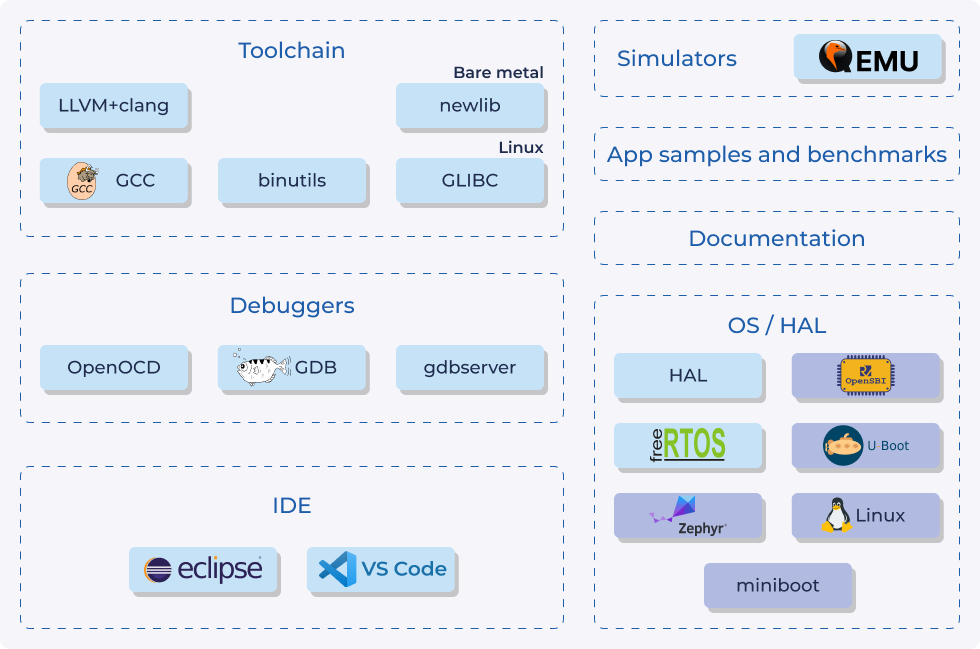
Figure 1. The SC-DT toolkit components overview
* Linux OS, Zephyr, miniboot, OpenSBI, and U-Boot are downloaded separately
LLVM Toolchain
LLVM is a powerful open-source toolchain that offers a comprehensive range of capabilities for compiler development, allowing for tailored customization to meet specific applications needs. LLVM by Syntacore is specifically developed for SCR cores, incorporating optimizations that ensure optimal application performance. It includes:
- Microarchitecture-aware optimizations
- Early and experimental support for important extensions for prototyping in hardware and on performance models
- Support for specific instructions and extensions
- Compatibility and support for SCRx cores in the upstream
LLVM Optimizations
LLVM leverages microarchitecture-specific optimizations, enhancing performance by generating code that is finely tuned to the underlying hardware characteristics, for example:
- LoopSplit pass, an equivalent of the GCC -fsplit-loops optimization. It allows vectorization to handle loops more efficiently. Additional optimizations, such as loop distribution, can further improve the results
- Speculative devirtualization, that allows users to substitute an indirect call with a direct call:
from this
struct A {
    virtual void vdo();
    void dosmth() {
        vdo(); // virtual call
    }
};
to this
void dosmth() { if (vtable[vdo] == A::vdo) A::vdo(); // + inline else // mispredict vtable[vdo](); } - Reverse if-conversion that transforms a group of predicated assignments into a conditional block
- Clustering of store instructions that attempts to schedule stores with adjacent target addresses together
- LoopIntWrapPredication — performs loop versioning and improves one of them for when the unsigned induction variable does not overflow
- Improved common subexpression elimination
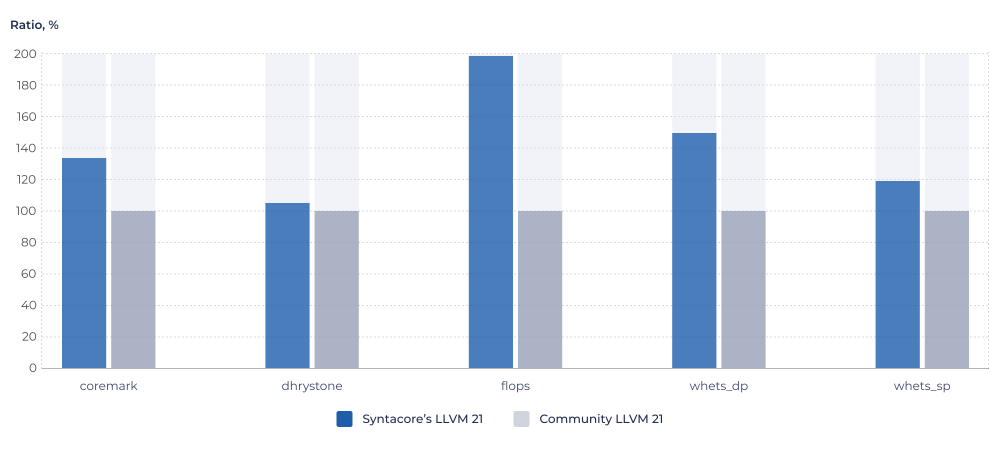
Comparison of Syntacore’s LLVM 21 to community LLVM 21, SCR4*
Comparison of Syntacore’s LLVM 21 to community LLVM 21, SCR9, SPEC CPU2006*
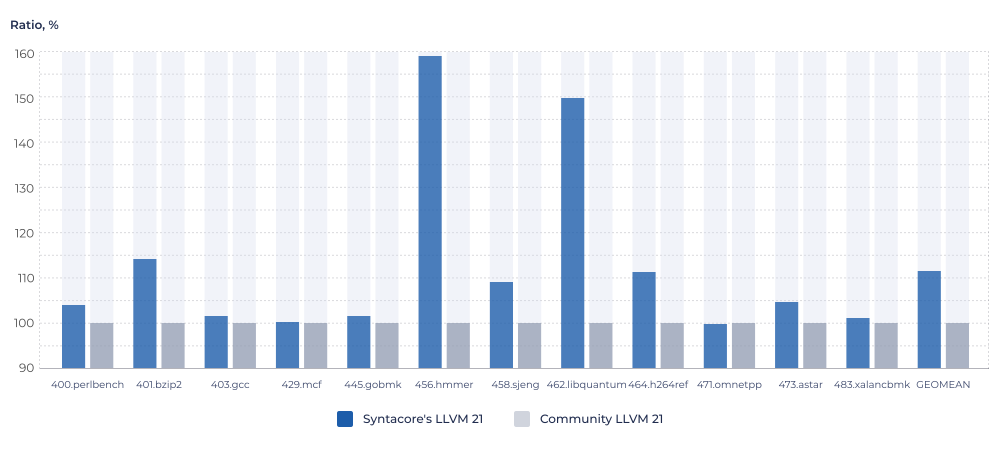
* Actual performance may vary depending on an application
The performance improvements shown in the chart result from architecture-independent SC-DT clang optimizations:
- Instruction scheduling with regards to the pipeline structure of the core
- Scheduling model-based instructions combining and reassociation
- Selecting settings with which loop unrolling will be performed
- Searching for complex patterns and optimizing them using instructions from available ISA extensions, for example, using the clmul instructions in CRC (cyclic redundancy check)
- Code alignment (functions, loops)
The toolkit offers CMake toolchains, which are essential utilities for configuring build environments for both bare metal and Linux applications. This dual capability streamlines the development process, allowing developers to easily set up and manage their build configurations regardless of the target platform.
GCC Toolchain
While LLVM is tailored for specific customizations of SCR processors, there are situations where the processor architecture only utilizes standard RISC-V extensions. In such cases regular GCC toolchain can be used.
The GCC toolchain is a traditional choice for many Linux systems and an industry standard: taken from the upstream project, it is simple and ready-to-use with no additional configuration needed.
GNU binutils, GNU libc and newlib, as parts of the GCC toolchain, are configured to work in conjunction with Clang, an LLVM compiler. This provides greater flexibility and compatibility, allowing to use different compilers and libraries based on specific needs.
Integrated Development Environments (IDEs)
In SC-DT, both toolchains, as well as debuggers, are seamlessly integrated with IDEs, significantly enhancing development efficiency and speed.
Visual Studio Code
Syntacore’s extension for VS Code provides a flexible environment for developing applications for the SCR cores. It features wizards and configuration files that simplify project configuration, streamlining the development process. VS Code supports lightweight debugging through integration with GDB (GNU Debugger), OpenOCD and QEMU, which allows developers to simulate their applications in a controlled environment before deploying them on actual hardware.
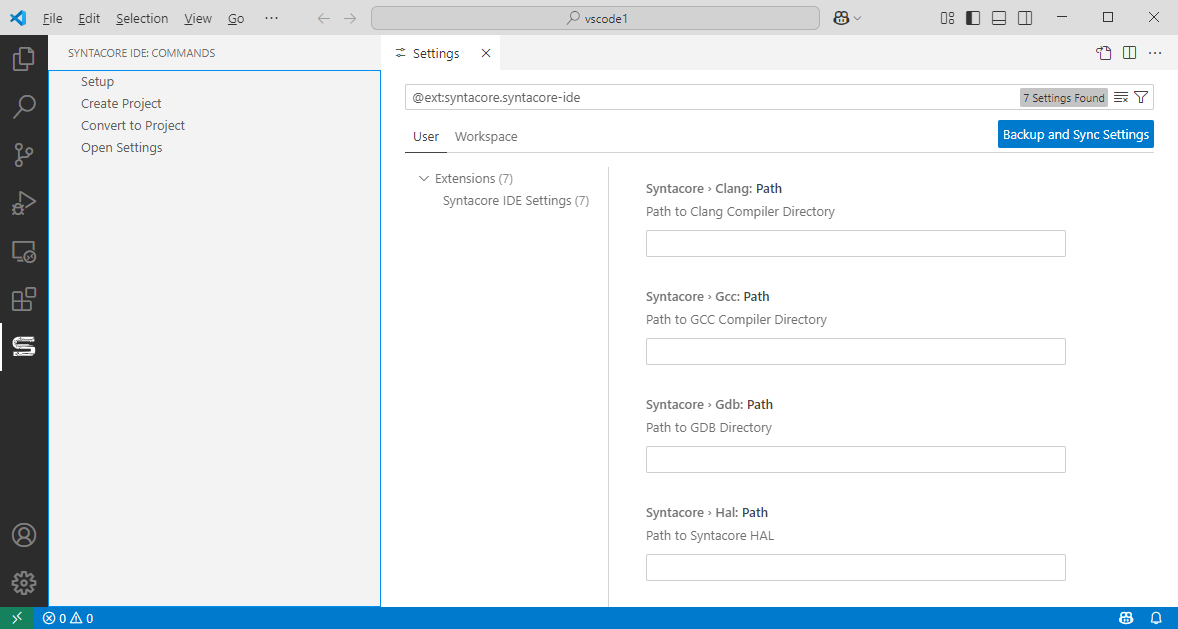
Figure 2. Project wizard in the Visual Studio Code IDE
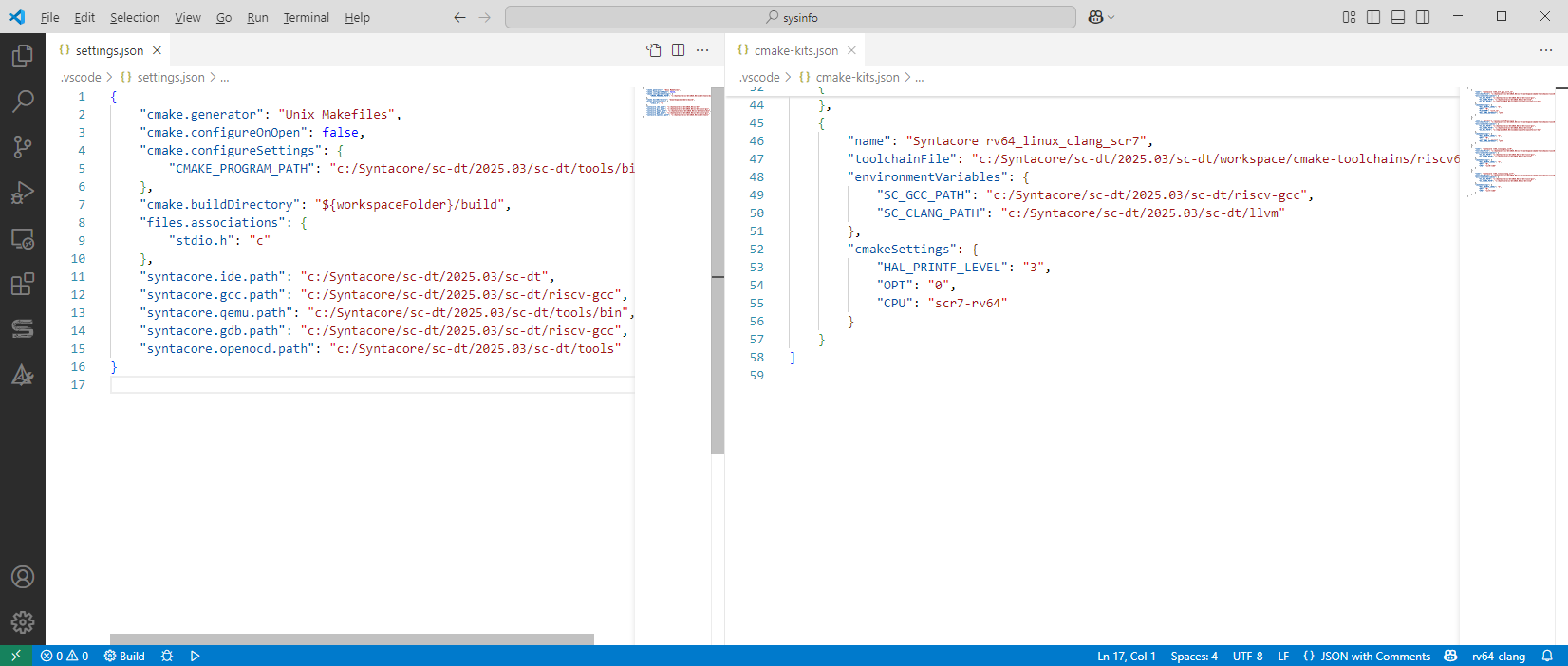
Figure 3. Pre-configured SCR-specific project settings
{
    "version": "0.2.0",
    "configurations": [
        {
            "name": "<debugger>/<toolchain>/<project name>",
            "variables": {
                "programPath": "${config:cmake.buildDirectory}/<toolchain>/<project name>.elf"
            },
            "type": "cppdbg",
            "request": "launch",
            "cwd": "${workspaceFolder}",
            "program": "${programPath}",
            "debugServerPath": "${config:syntacore.openocd.path}/bin/openocd",
            "debugServerArgs": "-s ${config:syntacore.openocd.path}/share/openocd/scripts -f /path/to/jtag_adapter.cfg -f target/syntacore_target.cfg -f syntacore/syntacore_ide_csr_cloak.cfg",
            "filterStderr": true,
            "miDebuggerPath": "${config:syntacore.gdb.path}/bin/riscv64-unknown-elf-gdb",
            "windows": {
                "debugServerPath": "${config:syntacore.openocd.path}/bin/openocd.exe",
                "miDebuggerPath": "${config:syntacore.gdb.path}/bin/riscv64-unknown-elf-gdb.exe"
            },
            "miDebuggerServerAddress": ":3333",
            "postRemoteConnectCommands": [
                {
                    "text": "load"
                }
            ],
            "useExtendedRemote": true,
            "stopAtEntry": true
        },
    ]
}
An example of debug configuration file in the Visual Studio Code IDE
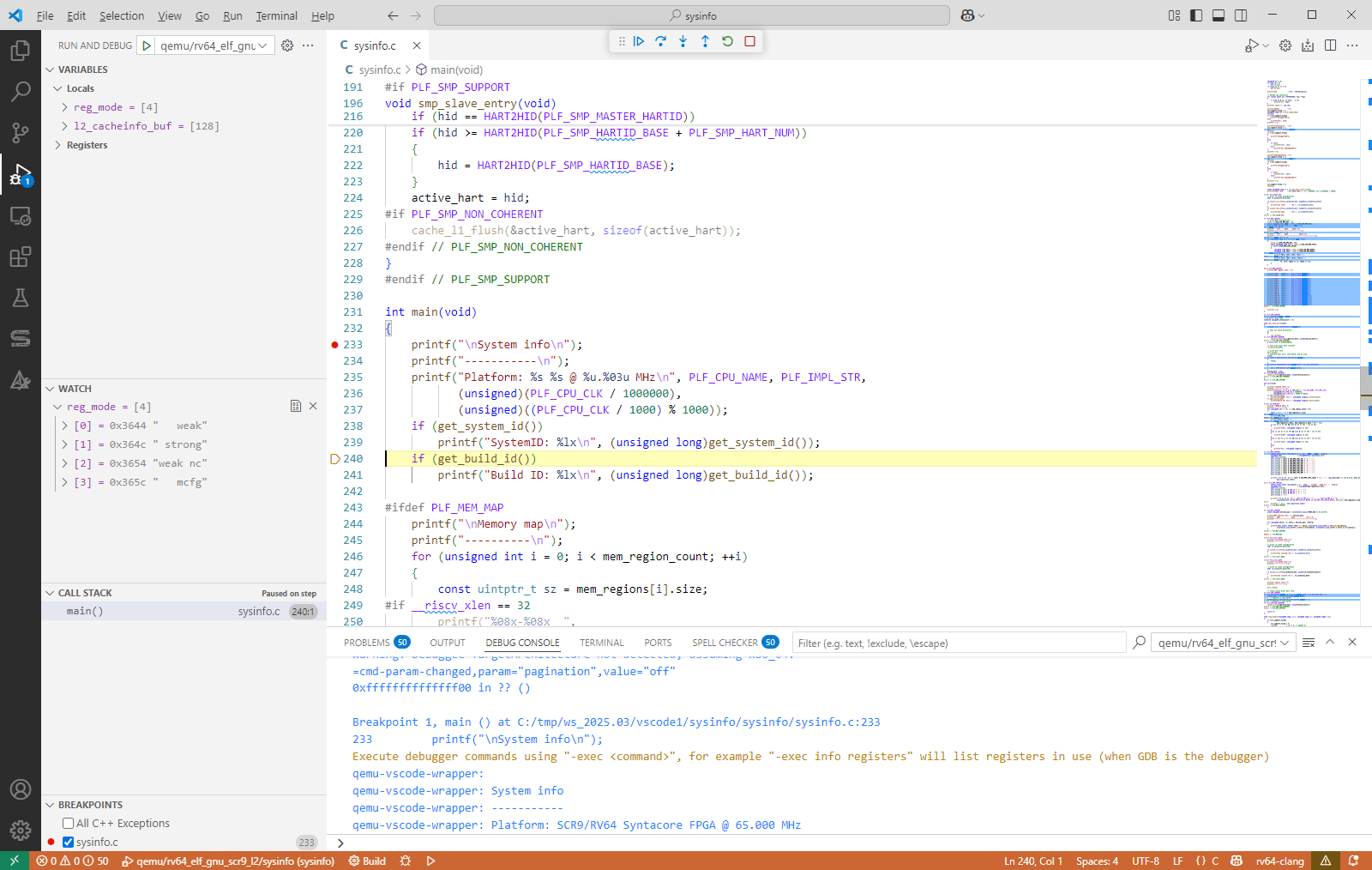
Figure 4. Debugging environment in the Visual Studio Code IDE
Eclipse-based IDE
Eclipse is a popular IDE that, in addition to the previously mentioned VS Code features, offers a familiar graphical interface, making it particularly user-friendly for developers working in embedded environments.
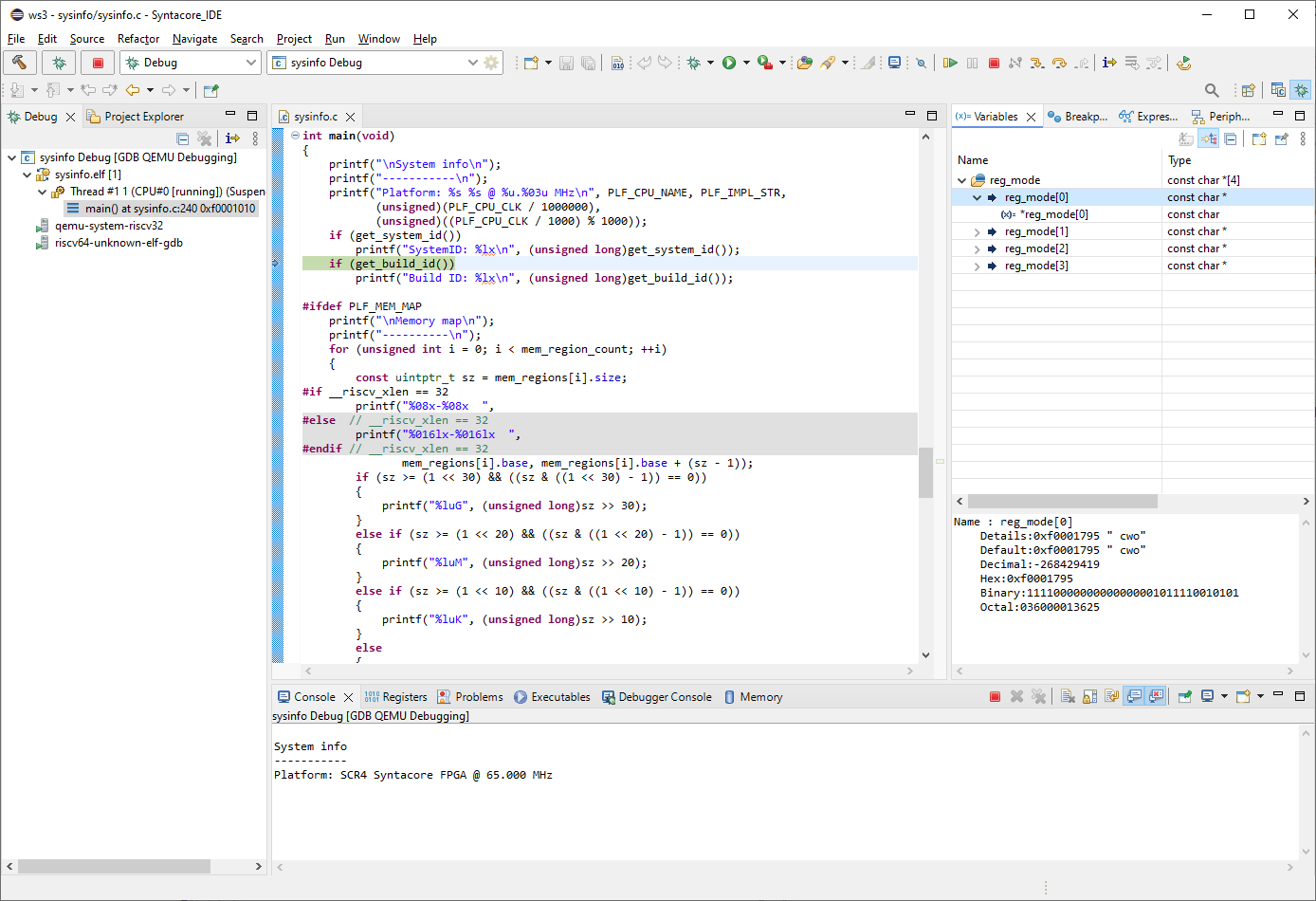
Figure 5. Debugging Environment in the Eclipse IDE
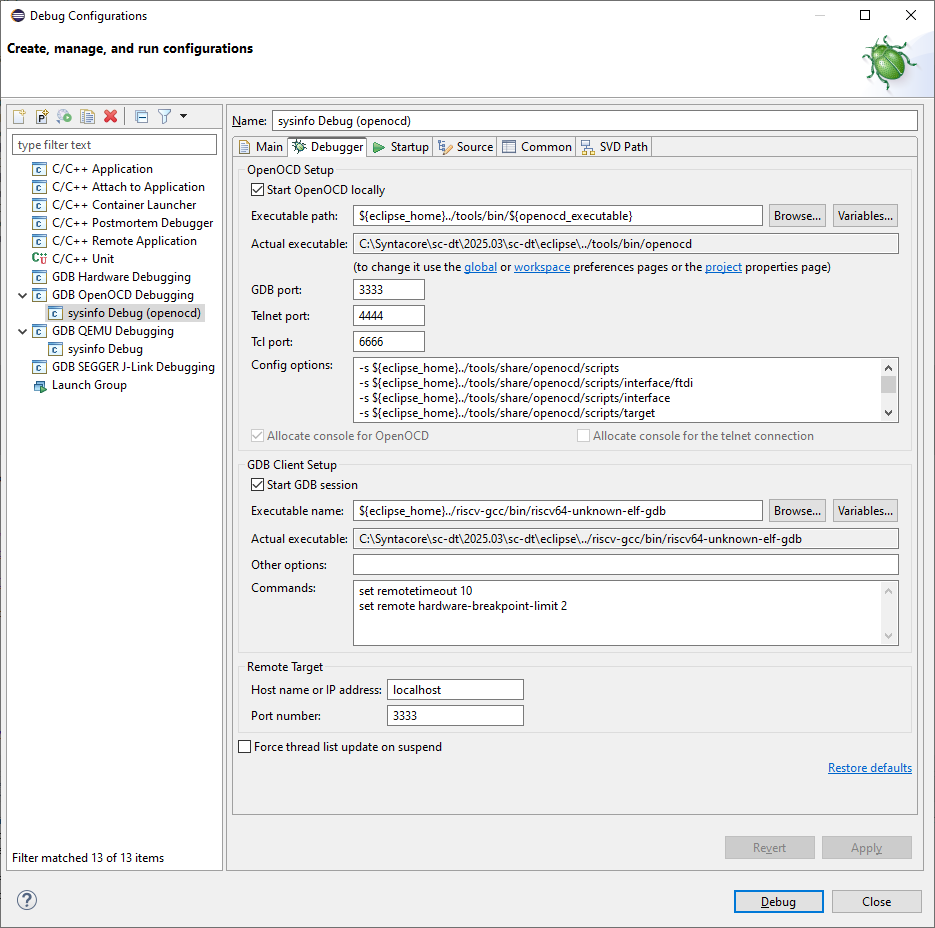
Figure 6. GUI-based Debugging Setup in the Eclipse IDE
Simulation Environment
The toolkit includes a QEMU environment for a quick emulation of Syntacore’s CPU cores and clusters. Developers can simulate and test their applications on a virtual platform that mimics the behavior of the real hardware, significantly speeding up the development process. QEMU can execute programs built using both upstream RISC-V GCC and LLVM toolchains, and the pre-configured toolchains distributed with the toolkit. QEMU also provides a built-in gdbserver that allows you to debug programs via GDB.
QEMU can be used in two modes: user-level simulation and system-level simulation.
- User-level simulation:
As displayed in the image below, the qemu-user mode allows you to launch Linux applications built for RISC-V on x86 Linux similarly to native applications (for example, nano and VIM). - System-level simulation:
where OS x86 is Windows and Linux, and OS (RISC-V) are any available OS for RISC-V, for example, Linux, FreeBSD, NetBSD. System-level simulator emulates bare metal RISC-V environment. This allows you to debug any bare metal applications, RTOS, and Linux.
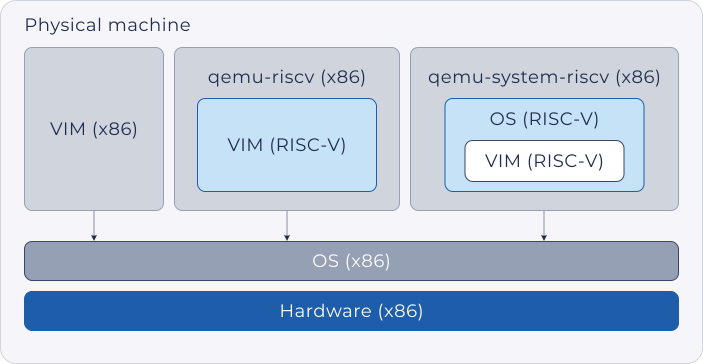
Figure 7. Simulation modes in QEMU
Debugging Tools
The toolkit includes robust support for debugging via OpenOCD and GDB, two widely used tools that work in tandem for the development of embedded systems. OpenOCD allows the user to interact with the SCR cores using the external debug interface JTAG/cJTAG as a transport layer.
Typical tasks include:
- Running debugging sessions with real-time monitoring
- Setting breakpoints, reading and writing memory, and stepping through code
- Flashing firmware onto a target device
OpenOCD generally works with a debug adapter, and it interfaces with tools like GDB to enable source-level debugging support.
GDB can be used to perform source-level debugging of software:
- Set breakpoints on specific lines of code or instruction addresses
- Inspect registers and memory
- Step through code line by line or instruction by instruction
The interaction between OpenOCD and GDB is quite straightforward: OpenOCD handles the low-level interaction with the hardware (e.g., communication with the RISC-V core via External Debug Interface), while GDB handles the high-level debugging commands.
Essential System Software
System software that comes with the toolkit contains everything developers need to launch and work with applications on bare metal or Linux using the SCR cores.
The toolkit provides:
- Ready-to-use hardware abstraction layer (HAL) for bare metal applications. It is essentially a library that contains a low-level startup code, a set of drivers to work with CPU clusters (for example, to control HW components — cache, interrupt controller, UART, etc.), and general linking rules for building bare metal applications that help developers quickly implement their designs on Syntacore’s SCR cores.
- A set of system sample applications for Syntacore’s RISC-V processors. Sample applications support both bare metal and Linux target environments, and require Syntacore HAL when compiled for bare metal, but do not need it for Linux. Sample applications are basic samples, both simple and more complex, targeted for various subsystems and functional blocks of SCR cores used to demonstrate their functionality. Developers can also use sample applications as templates to build their own ones.
- Recent versions of the two of the most popular real-time operating system (RTOS) projects for testing out more complex functionality on SCRs (single core/multicore) for embedded solutions: FreeRTOS and Zephyr (downloaded separately).
- Syntacore Linux support package for both Windows and
Linux-based hosts. The package contains system software stack required for running Linux on
Syntacore platforms:
- miniboot as a first stage bootloader. It performs only the essential hardware initialization.
- OpenSBI as a first stage bootloader also providing Supervisor Binary Interface (SBI) implementation. Pre-built version of OpenSBI for the SCR7 L2 cluster that can be utilized for demonstration purposes. If customization is required, you can download the OpenSBI source code from GitHub.
- U-Boot as a second stage bootloader
- Linux kernel images
- Linux root file system images
Syntacore FPGA SDK
Syntacore offers a quick and easy way to start, test and develop your SCR-based projects by providing a fully-featured software development kit. The FPGA SDK is a ready-to-use package that consists of an FPGA project along with an IP core and peripheral units. It comes with memory and standard interfaces enabling you to seamlessly integrate additional peripherals for a full-featured application testing.
Summary
Syntacore provides a professional and complete RISC-V development platform that includes pre-configured GCC and LLVM toolchains, flexible and user-friendly VS Code and Eclipse-based IDEs, advanced debuggers and simulators designed for creating highly-efficient applications for the SCR cores. The LLVM toolchain, built on top of the upstream LLVM, delivers performance improvements through Syntacore's advanced optimizations. Coupled with the tested and regularly updated system software and ready-to-use FPGA SDK, you get everything you need to start developing applications for RISC-V with minimal effort.